
Editing short-form video is mostly plumbing: fetch a clip, trim it, stack it with others, burn on a header, export, download. None of that is creative work — it’s the busywork around the creative work. So we handed it to an agent.
Shortmaker now ships a public Model Context Protocol (MCP) server. Connect Claude (or any MCP client), and you can make a finished vertical short by describing it — the agent calls Shortmaker’s tools to do the actual rendering, and hands you back a downloadable MP4.
What “editing with an agent” actually looks like
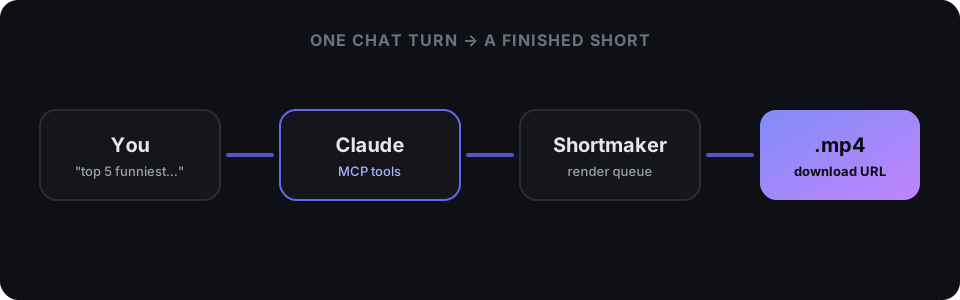
You type something like “Make a top-5 countdown of the funniest clips from these five TikTok links, with the header RANKING FUNNIEST MOMENTS.” The agent:
- Calls
resolve_linkon each URL — Shortmaker downloads the clip server-side and returns a reusable media token. - Calls
create_ranked_shortwith those tokens, your header, and the rank labels. - Blocks while the render runs in our pipeline, then returns a presigned download URL.
No timeline, no dragging, no export dialog. The agent drives the same render engine the web app uses — so entitlement, watermark policy, and quality caps are identical whether a human or an agent pressed “go”.
Connecting it
Mint a token in Settings → Connect Claude (MCP), then point your client at the endpoint:
claude mcp add --transport http shortmaker https://shortmaker.app/api/mcp \
  --header "Authorization: Bearer sm_mcp_…"
That’s it. The server is per-user: your token resolves to your account, your plan, and your exported-videos library.
The tools available today
- resolve_link — pull a TikTok / Instagram / YouTube link into Shortmaker as a reusable clip.
- create_ranked_short — a ranked-countdown vertical short with an accent header and rank rail.
- create_timeline — concatenate trimmed clips into one vertical video, with optional text overlays.
- download_video — a clean source download, no editing.
- get_render / wait_for_render / get_download_url — track a render and get a fresh, shareable link.
- list_videos — your recent exports.
Every tool that starts a render blocks until it’s done by default and hands back a download URL, so an agent can go from “here are five links” to “here’s your file” in a single turn.
Why MCP, and why now
Agents are getting genuinely good at deciding — which clips, what order, what caption. What they’ve lacked is hands. MCP gives them hands into real tools instead of hallucinated ones. For faceless content specifically — where the whole game is volume and consistency — an agent that can turn a batch of links into a batch of finished shorts is the difference between posting daily and posting when you find the time.
Ingest is link-based (a remote server can’t read files off your laptop), so the flow is: give the agent URLs, get back videos. Local-file workflows still live in the editor.
This is v1. Split-screen, commentary, and publish-to-YouTube are on the roadmap for the MCP surface — the render engine already does them; we’re just exposing them as tools.
Connect it, and let the agent do the plumbing.